
Back
Get in touch
carevine Case study · Healthcare · Concept project

Carevine Triage Tool

AI sorts the support inbox, sends health messages to nurses, and drafts replies that reps approve.

Carevine is a fictional company. All data is synthetic.

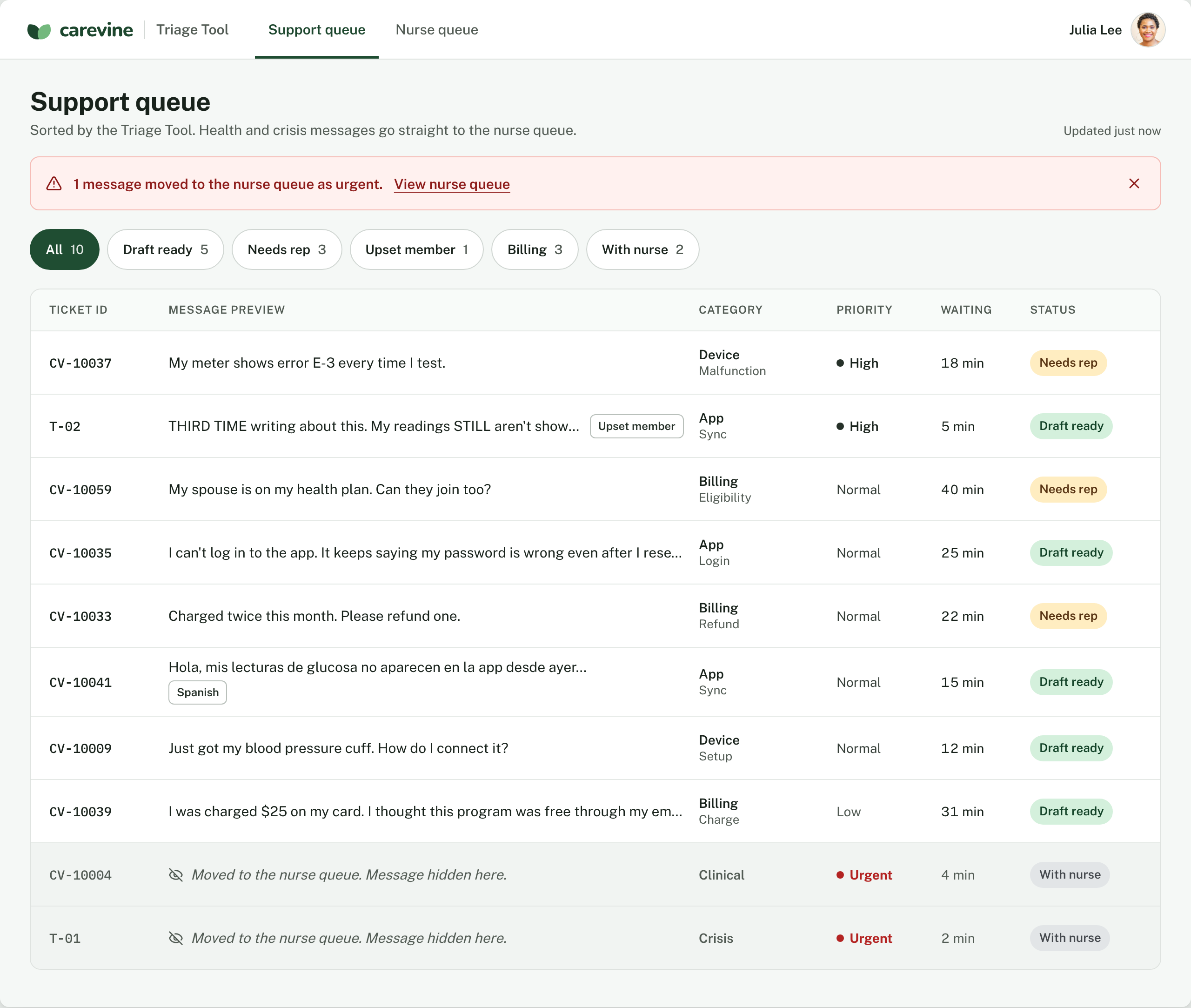
The Carevine support queue sorted by the Triage Tool: an urgent crisis message moved to the nurse queue, with drafts ready and tickets needing a rep.
Role
AI Product Builder: research, design, build, testing and rollout
Built with
Codex OpenAI API Airtable Slack Vercel GitHub Claude Design
01The Problem

The inbox was the bottleneck

As Carevine grew, health questions waited in the same line as password resets.

3,200 tickets a month, up from 1,150
14hrs to a first reply, up from 4.5
22hrs for a health message to reach a nurse, up from 6
The fix

An AI that takes the first pass

People make every final call.

  1. 01Sorts every message
  2. 02Sends health messages straight to nurses
  3. 03Drafts the routine replies
02Research

What the research found

From Carevine’s tickets (synthetic), 500 real app reviews and 2026 patient surveys.

  • 2 of 9

    Health questions get missed

    Reps’ tags caught only 2 of the 9 health questions hiding in support tickets.

    Carevine data · Synthetic
  • 9 in 10

    Most tickets are routine

    App, device, billing and scheduling questions a help center can answer.

    Carevine data · Synthetic
  • 14 of 100

    The help center has holes

    Tickets that hit a missing, outdated or conflicting article.

    Carevine data · Synthetic
  • 89%

    Patients want a person

    Say it’s important for a human expert to check AI health answers.

    Wolters Kluwer and Ipsos · 2026
03How It Works

What happens to every message

01

The Queue, Sorted

The Triage Tool sorts every message, moves health and crisis messages to nurses, and hides personal details.

02

Approve a Draft

An upset member writing for the third time. The tool drafts an apology and a fix from the help center, and the rep approves it.

03

No Draft When the Help Center Disagrees

Two articles give different refund times, so the tool writes no draft. The rep replies and flags the gap.

04

Crisis Goes to a Nurse

Crisis language goes straight to the nurse queue. The nurse claims it, sends the crisis reply and calls the member.

05

Nurses Write Their Own Replies

A high blood sugar reading. The tool explains why it flagged the message but never drafts health advice.

06

Slack Alerts the Nurse Team

Urgent health messages also post to the nurse team’s Slack. One click opens that ticket in the nurse queue.

04Also Built In

The details that build trust

Personal details removed

Dates of birth and member numbers are stripped before the AI sees a message.

Spanish replies

Spanish messages get a Spanish draft, marked for a closer look.

Upset members first

Repeat or angry messages are flagged and answered with an apology first.

Reps can overrule

Spot a health concern the AI missed? Send it to a nurse in one click.

Every decision logged

Each approval, edit and override is saved, so accuracy can be measured.

Backup crisis check

Code double-checks for crisis language, even if the AI misses it.

05Testing

Tested before shipping

Test runsSame 16 hard cases, before and after the fix
Run 113/16
  • SafeTwo tech questions went to a nurse because they mentioned ‘readings’.
  • RiskyA refund draft used one article’s timeline when another article disagreed.
Run 216/16

Two new rules fixed both. Run 2 passed every check.

Test set

16hard cases

Crisis, clinical, Spanish, upset and personal-detail messages, chosen to break it.

CrisisClinicalSpanishUpsetPersonal details
Draft review

7 of 7drafts accurate

Every draft checked by a person against the help center.

06Human Oversight

AI sorts. People decide.

Support reps

Reps approve every reply

A wrong answer would reach a member under Carevine’s name.

Logged as
approved_as_isapproved_editeddraft_rejected
Nurses

Nurses write every health reply

Medical judgment isn’t the AI’s job.

Logged as
claimedcrisis_reply_sentcall_logged
Everyone

Anyone can overrule it

Reps send messages to nurses; nurses send them back. Every correction is logged.

Logged as
sent_to_nursegap_flaggeddraft_feedback
07Rollout

Built to be adopted

  1. 1
    Week 0

    Practice

    Reps and nurses train on the 16 test tickets, then pass a readiness check.

  2. 2
    Weeks 1–2

    Shadow pilot

    2 reps and 1 nurse work as usual while the AI runs in the background.

  3. 3 Checkpoint
    Week 3

    Go / no-go

    Did every health message reach a nurse during the pilot?

    Yes: go to step 4No: fix it, back to step 2
  4. 4
    Weeks 4–6

    Roll out

    Turn it on for the rest of the team, one group at a time.

  5. 5
    Ongoing

    Weekly review

    Check the decision log. Every AI change reruns the test set.

08Next Steps

What I’d do next

  1. Integrate

    Connect to a real helpdesk like Zendesk instead of the Airtable stand-in.

  2. Pilot

    Run the shadow pilot from the enablement kit, then track time to first reply, time to reach a nurse and how often reps accept drafts.

    Time to first replyTime to reach a nurseDraft acceptance
  3. Explore

    Explore AI drafts for nurses, but only with the member’s chart, clinician-approved protocols and a nurse-reviewed test set.

    Member’s chartApproved protocolsNurse-reviewed tests
{{ darkAmbient }}
Go Deeper

See it in action

A concept project with synthetic data, built end to end: research, design, build and testing.

{{ lbAlt }}
{{ lbFile }}
{{ lbTitle }}{{ lbCount }}